ACAV Software Overview
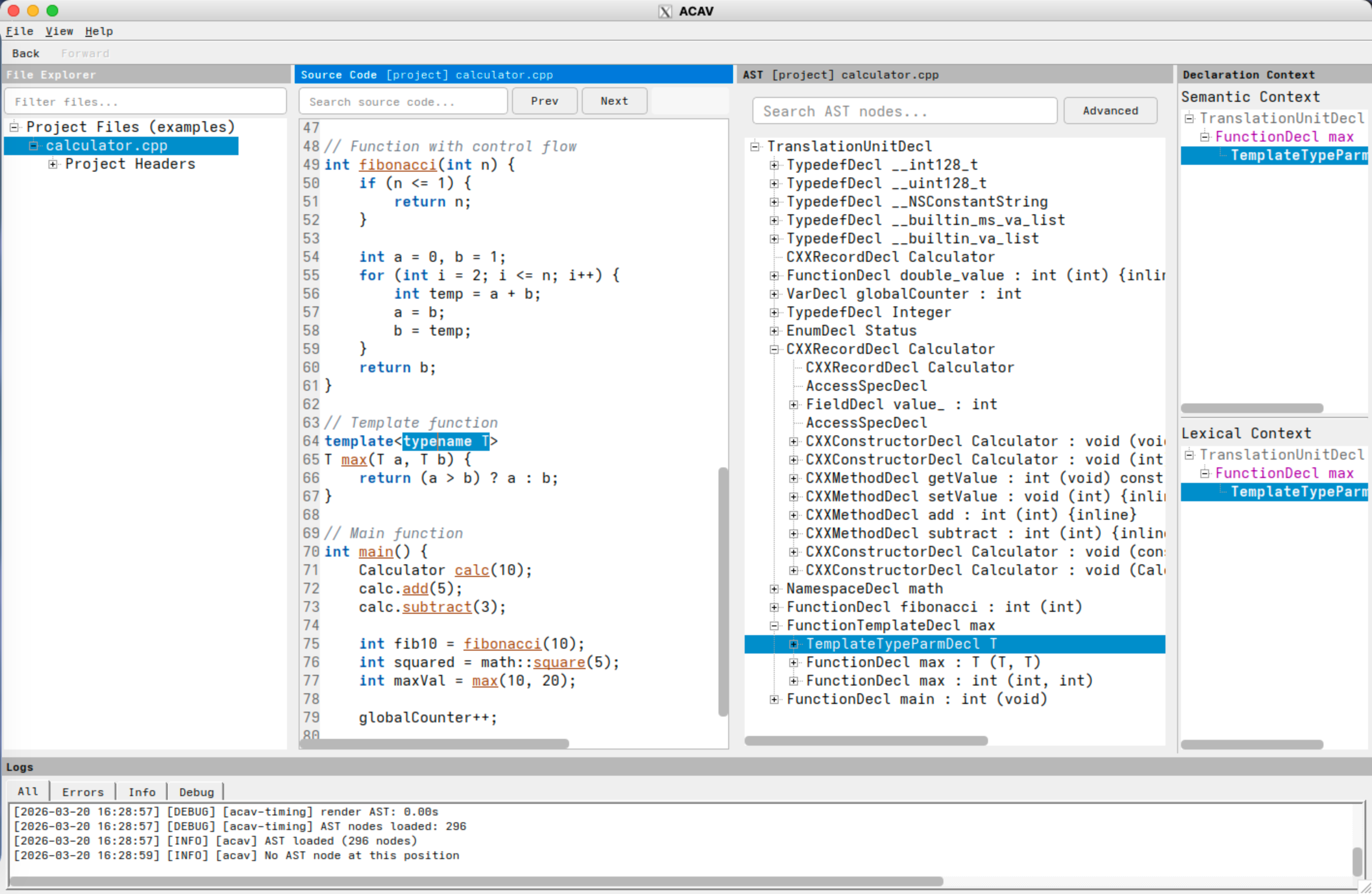
ACAV (Aurora Clang AST Viewer) is a desktop application for interactive
exploration of Clang abstract syntax trees in real C, C++, and Objective-C
projects. Instead of working from raw -ast-dump output, users can inspect
source code, AST structure, declaration context, and project files side by
side.
The project is intended for students, researchers, and developers who need to understand how Clang parses a codebase. ACAV focuses on read-only inspection: it helps users trace source locations to AST nodes, inspect node properties, and study how program structure is represented inside Clang.
What ACAV Helps You Inspect
ACAV is useful for several common workflows:
- learning how language constructs map to Clang AST nodes
- exploring declaration scope and semantic context in large codebases
- debugging or developing Clang-based analysis tools
- searching nodes by kind, name, or type
- exporting selected AST subtrees to JSON for further analysis
The interface supports bidirectional navigation between source code and the AST. A user can select a location in the source view and highlight the corresponding AST node, or select a node in the tree and jump back to the relevant source range.
Typical Workflow
To use ACAV on a project, first build the software from this repository. Then
generate a JSON compilation database for the codebase you want to inspect.
Usually this file is named compile_commands.json. CMake can emit it directly,
and tools such as Bear can generate it for build systems that do not.
After that, launch ACAV and point it at the compilation database:
acav -c /path/to/compile_commands.json
Once the project is loaded, users can browse project files, trigger AST extraction for a translation unit, inspect node details, search the tree, and export subtrees.
Key Capabilities
- bidirectional navigation between source locations and AST nodes
- project file browsing with included headers and translation units
- declaration context panels for semantic and lexical scope
- AST and source-code search for targeted inspection
- JSON export for selected AST regions and subtrees
Documentation
Additional project information can be found in: